

Steps To Determine Relevant Files For Your Program
To determine relevant files or APIs for your program, combine the following:Relevant Files from one of Product Type and…
-
Credit: Includes term loans, line of credit, credit or charge card (secured or unsecured). Submit underwriting decisions through the Applications API and create accounts through the Accounts API. -
Deposit: Includes deposit accounts, debit card or prepaid card (secured or unsecured). Create accounts through the Accounts API.
Relevant Files from one of Account Holder Type and…
- Report end customers through the Entity API. For
commercialor mixedcommercial and consumerprograms, also report their entity relationships.
Relevant Files or API from any of Disbursement Type
- For card programs, we will receive information on
Cardfrom you andNetwork Settlementfrom your Issuing Processor - For outgoing bank transfers, either
ACHorWireare supported through API orACHvia Nacha files
ACH and Wire transfers
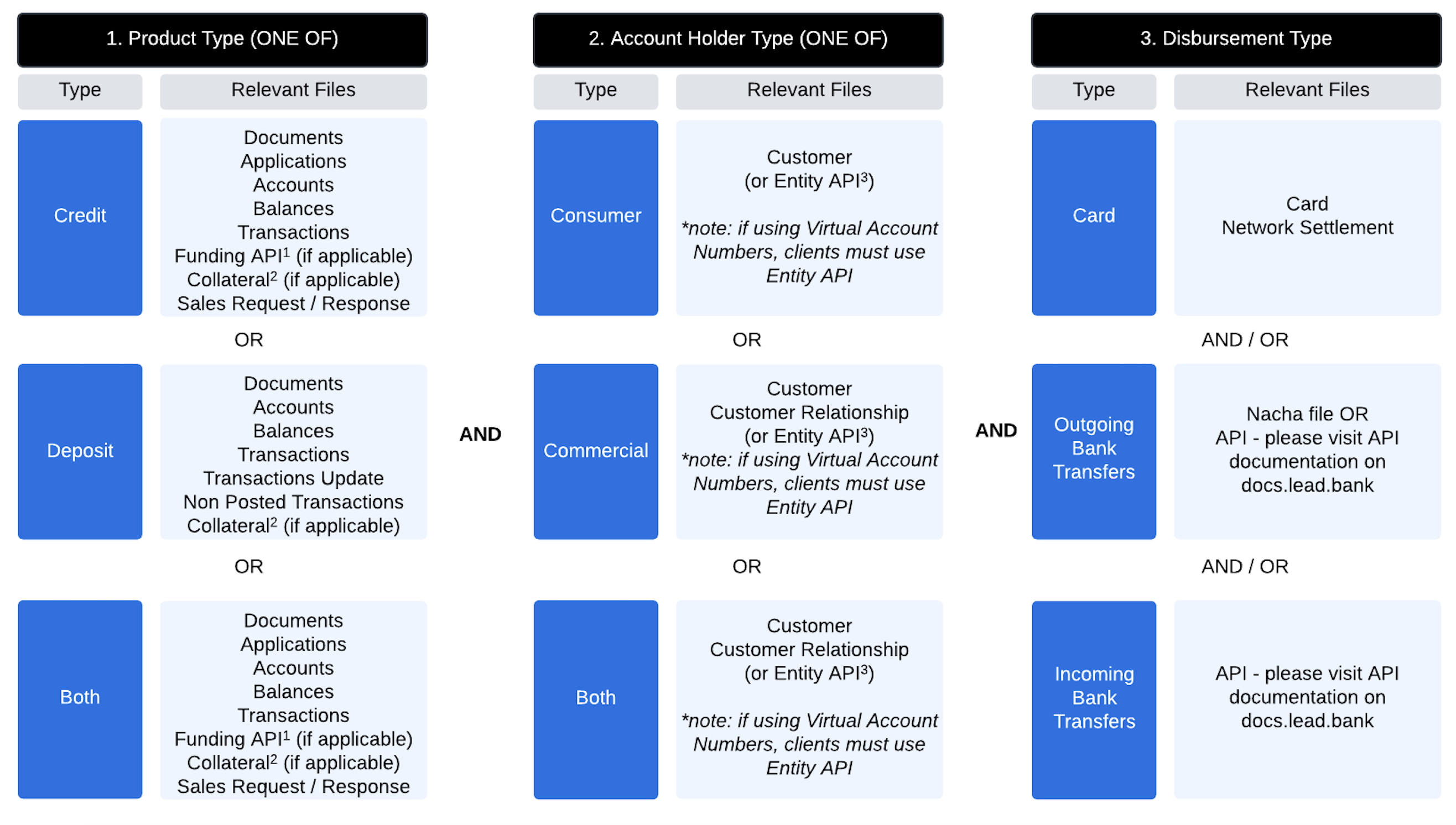
2. This will be relevant for secured debit or credit products to notify Lead of details on the collateral for reconciliation and bank oversight.
3. If you are using virtual account numbers, you must use the Entity API to submit entity information.
File Submission FAQs
Can files be submitted multiple times a day?
Can files be submitted multiple times a day?
Only entity files can be submitted multiple times a day. All other files are processed once per day.
What do I upload if there are no updates for the day?
What do I upload if there are no updates for the day?
Submit an empty file for a day when there are no updates. This will allow your files to stay up to date.
What time are the daily files due?
What time are the daily files due?
We require files on a daily basis with every calendar day’s files sent before 6:00 a.m. CT the following business day (T+1).
Daily Files Delivered by Lead
- Activity Report
- Balance Report
- ACH Settlement Cash Reconciliation Report (for programs with ACH activity)
- Sales Request File (credit-based programs)