

For a full, end-to-end description of how a lending product is created in Lead’s system, see the Lending and Overdraft page for more information.
Introduction
Lead supports the creation and funding of both term loans and lines of credit. Lending workflows require two foundational objects, regardless of the product type:- Balance (also referred to as Subledger Balance): This object represents (1) all outstanding amounts owed by the entity to whom the loan is issued (e.g., outstanding principal) and (2) all terms associated with the loan product (e.g., expected maturity date).
- Funding: This object represents a single draw event created against a
Balanceobject. In other words, it represents an instruction for Lead to fund the loan.
Balance object to establish all of the terms of the loan (e.g., the maximum funding amount expected, repayment details). Once successful, you then create a Funding object to execute a draw against the Balance, which instructs Lead to fund the loan for the requested amount. Lead intentionally decouples these two steps in order to support multi-draw use cases — which would be modeled as a single Balance object and multiple Funding objects created against it.
In a line of credit use case, you first create a Balance object to establish all of the terms of the loan. Once successful, you then create a Funding object when the borrowing entity draws against their line of credit. Lead then makes those funds available.
The Balance (or Subledger Balance) Object
Across Lead’s product,Balance objects can have a type of either deposit or credit depending on the use case. In lending use cases, the Balance always tracks an outstanding amount the borrowing entity owes, so all Balances you create must have a type of credit. Since Lead needs to have all of the required terms associated with a loan before it can provide funding for it, the first step in the loan product workflow is always the creation of a Balance via the Create a Subledger Balance API.
When the Balance is first created, all amounts (e.g., outstanding principal, outstanding fees) are zero because no funding, repayments, or other loan activity has occurred yet — and there is no owed amount to track. At this point, you can think of the Balance object as representing an “unfunded loan”, and it only indicates to Lead your intention to create a loan with a certain set of loan terms.
Structure
Depending on the type of loan product you are creating, you will create theBalance object with one of two structures:
- Non-revolving: Use this structure if your product has a fixed amount of principal and repayments do not restore available credit. Examples of this are closed-end term loans (e.g., a BNPL loan) where there is a known loan amount upfront that is funded, then the borrower repays the borrowed amount until the loan reaches a terminal status.
- Revolving: Use this structure if your product has a credit limit, the borrower can draw up to that limit, and repayments restore available credit. Examples of this are lines of credit (e.g., a commercial loan) where the borrower is underwritten up to a certain amount, the borrower draws against that limit, then can repay to regain access to that limit (e.g., $1000 credit limit, draw $900, repay $900, then draw another $500, and so on).
Funding event (i.e., draw) over its lifetime, while a revolving balance will typically have multiple Funding events over its lifetime.
Balance Lifecycle
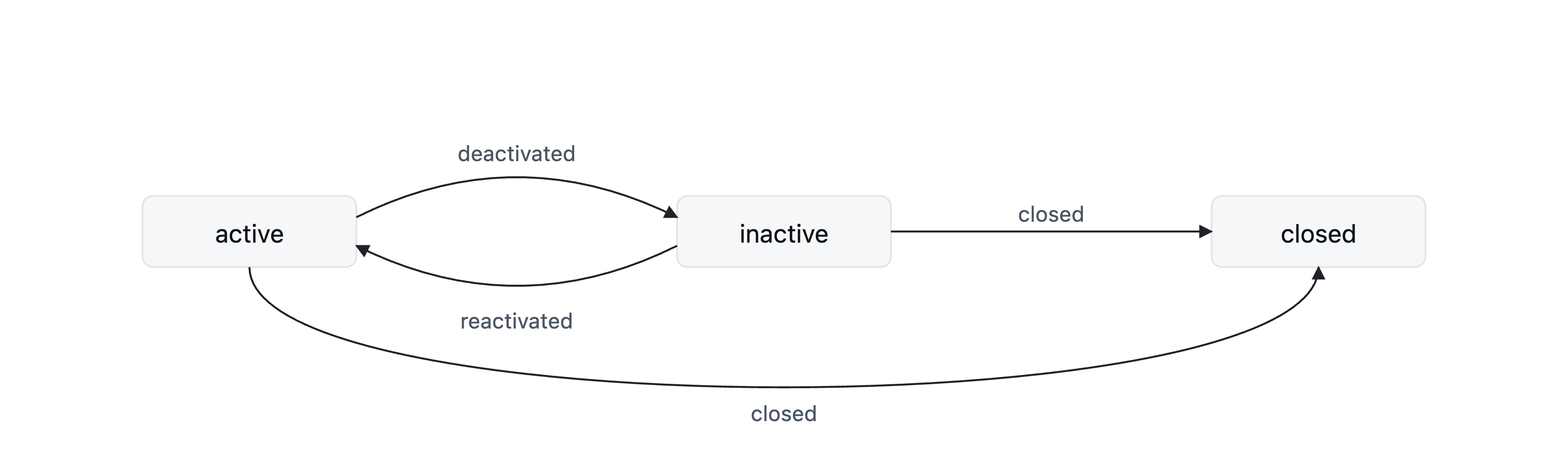
Balance objects start in an active status when you create them via the Create a Subledger Balance API. Subsequently, when you report updates to the Balance object via the Balance File, you can update the Balance status to inactive or closed. Refer to the Balance Statuses page for when each should be used. Since you determine and communicate these state transitions to Lead, Lead does not send webhooks.
Funding Object
TheFunding object is an instruction to Lead to provide funding for an active loan (represented by a Balance). When you call the Create a Funding API, you provide three core pieces of information: (1) the id of the Balance that you are requesting funding for, (2) the amount of principal that you are requesting, and (3) in certain use cases you will also provide information about origination fees charged.
Once Lead posts the funding amount to the Funding FBO (which Lead configures for your program), Lead considers those funds disbursed and holds them on behalf of the borrower. You can then use any payment rail supported by Lead (e.g., ACH, wire, internal transfer, instant payments) to execute an external disbursement to the party that is owed the funds.
Principal
Theprincipal hash on the Funding object contains the total amount that you are requesting Lead to make available. There are three component amounts — and the total is what Lead makes available in the Funding FBO.
- External disbursement amount: Loan amount that you expect to disburse externally to a counterparty shortly after Lead makes the funding available.
- Withheld amount: Loan amount that you expect to withhold for an indefinite amount of time. The use of this amount is specific to certain use cases and may not be applicable to yours.
- Merchant origination fee amount: Origination fee amount charged to the merchant, most typically in BNPL use cases. The use of this amount is specific to certain use cases and may not be applicable to yours.
Example
See how principal should be divided into its component amounts.1
Initial Purchase
A borrower makes a $1000 purchase for a new refrigerator with RefrigeratorCo, and opts in to a BNPL loan issued by BNPLCo at checkout. BNPLCo partners with Lead to offer BNPL loans.
2
Agreement Split
BNPLCo’s agreement with RefrigeratorCo is that 50% of the loan proceeds are sent to them immediately, while the remaining 50% is sent to them after three (3) days.
3
Transaction Fee
BNPLCo charges RefrigeratorCo (the merchant) a 10% fee for every transaction.
Funding object, BNPLCo should populate the amounts as follows:
1
Total Principal
$1000
2
External Disbursement Amount
$450 ($1000 x (1-10% fee) x 50% disbursed immediately)
3
Withheld Amount
$450 ($1000 x (1-10% fee) x 50% disbursed after three days, so withheld initially)
4
Merchant Origination Fee Amount
$100 ($1000 * 10% fee)
We require that you break these amounts into their components so that we can appropriately create internal accounting records reflecting how each amount is used.
Other Fees
Theother_fees hash on the Funding object contains information about other fees that are charged associated with the draw that do not impact the amounts that Lead needs to make available in the Funding FBO. Currently, Lead supports only one type of other fee:
- Borrower origination fee amount: Amount you charge the borrower as part of issuing the loan product. You collect this amount out-of-band from Lead, which is why the principal amount does not include it.
Funding creation so that we can appropriately create internal accounting records.
Funding Lifecycle
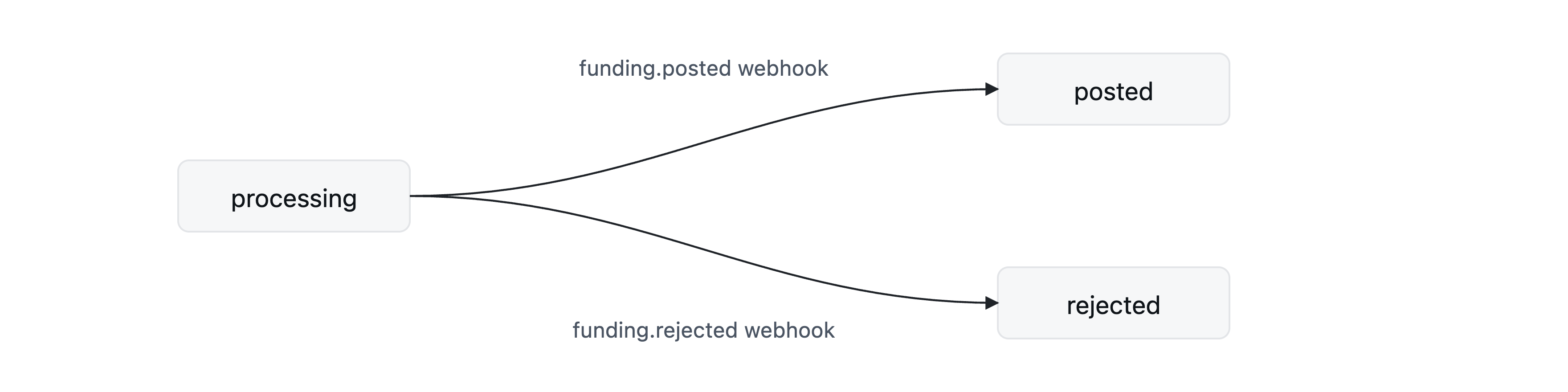
Funding objects are in a processing state when you initially create them via the Create a Funding API.
Asynchronously (but typically in a very short amount of time), Lead posts the funding to your Funding FBO, at which point the status of the Funding object transitions to posted, and Lead sends a webhook. Until you receive this webhook, you should assume that the funds are not yet available in the Funding FBO.
Finally, there are scenarios where Lead fails or rejects the funding request, and your system must be ready to handle state transitions from processing to a rejected status in those cases.
For more details on events and webhooks, visit our Events & Webhooks page.