> ## Documentation Index
> Fetch the complete documentation index at: https://docs.lead.bank/llms.txt
> Use this file to discover all available pages before exploring further.
# Program Files
> Understand which files and APIs you'll use to support your program.
## **Steps To Determine Relevant Files For Your Program**
To determine relevant files or APIs for your program, combine the following:
### `Relevant Files` from one of `Product Type` and...
* `Credit`: Includes term loans, line of credit, credit or charge card (secured or unsecured). Submit underwriting decisions through the [Applications API](/api-integrations/applications/overview) and create accounts through the [Accounts API](/api-integrations/accounts/overview).
* `Deposit`: Includes deposit accounts, debit card or prepaid card (secured or unsecured). Create accounts through the [Accounts API](/api-integrations/accounts/overview).
If you are using virtual account numbers, you must use [Entity API](/api-reference/endpoint/entity/create-an-entity) to submit entity information.
### `Relevant Files` from one of `Account Holder Type` and...
* Report end customers through the [Entity API](/api-integrations/entity/overview). For `commercial` or mixed `commercial and consumer` programs, also report their entity relationships.
### `Relevant Files` or `API` from any of `Disbursement Type`
1. For card programs, we will receive information on `Card` from you and `Network Settlement` from your Issuing Processor
2. For outgoing bank transfers, either `ACH` or `Wire` are supported through API or `ACH` via Nacha files
For incoming bank transfers, we support incoming `ACH` and `Wire` transfers
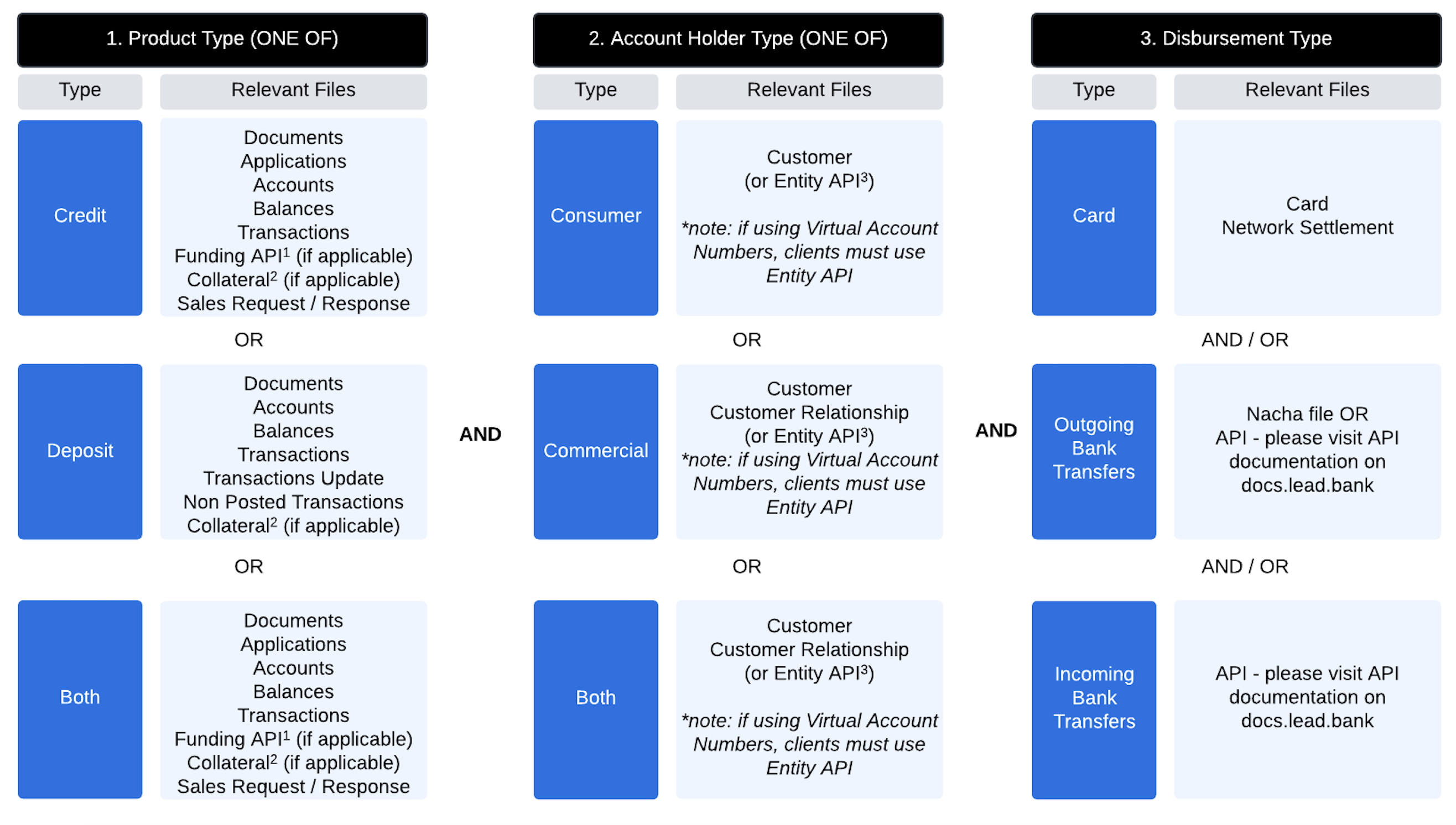 1. This will be relevant for credit products utilizing incoming ACH for disbursements and funds need to be funded in accounts real-time prior to scheduled ACH.\
2. This will be relevant for secured debit or credit products to notify Lead of details on the collateral for reconciliation and bank oversight.\
3. If you are using virtual account numbers, you must use the [Entity API](/api-reference/endpoint/entity/create-an-entity) to submit entity information.
## File Submission FAQs
Only entity files can be submitted multiple times a day. All other files are processed once per day.
Submit an empty file for a day when there are no updates. This will allow your files to stay up to date.
We require files on a daily basis with every calendar day’s files sent before 6:00 a.m. CT the following business day (T+1).
## Daily Files Delivered by Lead
* [Activity Report](/file-integrations/reporting/daily-activity)
* [Balance Report](/file-integrations/reporting/daily-balance)
* [ACH Settlement Cash Reconciliation Report ](/file-integrations/reporting/ach-cash-reconciliation)(for programs with ACH activity)
* [Sales Request File ](/file-integrations/sales-request-and-response/request-schema)(credit-based programs)
1. This will be relevant for credit products utilizing incoming ACH for disbursements and funds need to be funded in accounts real-time prior to scheduled ACH.\
2. This will be relevant for secured debit or credit products to notify Lead of details on the collateral for reconciliation and bank oversight.\
3. If you are using virtual account numbers, you must use the [Entity API](/api-reference/endpoint/entity/create-an-entity) to submit entity information.
## File Submission FAQs
Only entity files can be submitted multiple times a day. All other files are processed once per day.
Submit an empty file for a day when there are no updates. This will allow your files to stay up to date.
We require files on a daily basis with every calendar day’s files sent before 6:00 a.m. CT the following business day (T+1).
## Daily Files Delivered by Lead
* [Activity Report](/file-integrations/reporting/daily-activity)
* [Balance Report](/file-integrations/reporting/daily-balance)
* [ACH Settlement Cash Reconciliation Report ](/file-integrations/reporting/ach-cash-reconciliation)(for programs with ACH activity)
* [Sales Request File ](/file-integrations/sales-request-and-response/request-schema)(credit-based programs)